Weatherzone: Weather Forecasts
- 4.5
- Rating
- 5.00M
- Installs
- Free
- Price
 Analysis by App-foxy
Weather apps often look simple until I need one in a hurry. A forecast can be technically detailed yet difficult to scan, or visually attractive while hiding the one piece of information I actually need before leaving home. Weatherzone: Weather Forecasts takes a more information-focused approach. It is a free weather app from DTN APAC Pty Ltd, built around forecasts, radar, and ways to view changing conditions rather than just displaying one large temperature.
After spending time with it, I see its main value in helping me answer practical questions: Will rain arrive during my commute? How quickly will conditions change this afternoon? Is the forecast stable enough to plan an outdoor job? The app is available to everyone by its content rating, and its broad audience is reflected in more than five million installs and an average rating of 4.4 from roughly 165 thousand ratings. That does not make it perfect, but it does suggest that the combination of local detail and familiar weather tools works for many people.
My review focuses especially on how comfortably different people can use it. I looked at readability, navigation, touch demands, visual and sensory considerations, and the situations in which the app is helpful or frustrating. Weather information is often needed while walking, travelling, working outside, or dealing with poor visibility, so inclusive design matters just as much as forecast depth.
You May Also Like

 Blood Strike: 2.5 Anniversary
Blood Strike’s Loadouts Turn Every Drop Into a Tactical Gamble
A close look at Blood Strike’s custom loadouts: how fast access to signature weapons reshapes its battle royale rhythm, rewards preparation, and narrows the gap between fights.

 Pandora - Music & Podcasts
Pandora’s Music Is Easy to Start, but Harder to Recover
Pandora’s strength is its low-effort path from a seed to a station. Its weak spot is how much confidence it asks you to place in connection, setup, and quiet recovery.

 8 Ball Pool
 Is Built on Rivalries, Rematches, and Routine
A close look at the rivalries, rematches, shared routines, and unanswered safety questions that turn a quick pool match into a persistent mobile community.

 Samsung Music
’s Quiet Strength Is Playing What You Already Own
Its reach comes less from spectacle than from dependable access to a personal library. That simplicity is both the app’s strongest retention engine and its ceiling.

 AccuWeather: Weather Radar
AccuWeather Review: A Quick, Clear Forecast for Everyday Decisions
For everyday plans, the best forecast is the one you can understand quickly. AccuWeather makes rain timing, radar, and local conditions easy to act on, with a few trade-offs.

 Hill Climb Racing
Why Hill Climb Racing Still Turns Crashes Into One More Run
A tiny car, a bumpy hill and one more upgrade: Hill Climb Racing keeps resurfacing because its simple chaos makes every near-miss feel personal.
More From Our News Desk



How clearly the forecast can be read and navigated
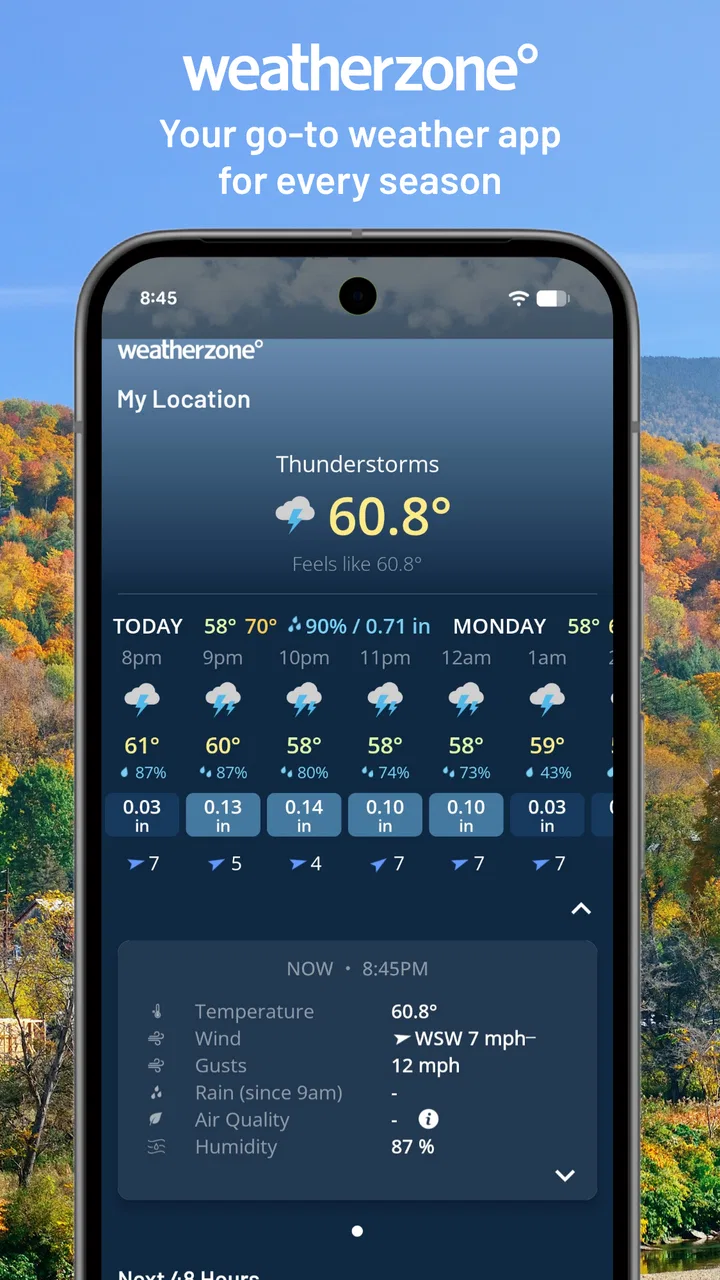
The first thing I appreciate is that Weatherzone is not limited to a single daily prediction. It combines hourly information with forecasts reaching out to fourteen days, alongside rain and snow radar, custom graphs, and other weather details. That range is useful, but it also means the app asks me to move between different levels of information. A quick glance and a careful planning session are not the same task here.
For a fast check, I would start with the current conditions and the hourly view. This is the most useful path when I am deciding whether to take an umbrella or change the time of a short trip. The hourly forecast gives the day a timeline, which is easier to act on than a general statement such as “showers possible.” It lets me look for a pattern: a dry morning, a wet lunchtime, or a late improvement.
The longer forecast is better for broad planning than for making precise promises. I would use it to decide whether an outdoor plan deserves a backup option, not to assume that a particular hour several days away will remain unchanged. This distinction is important for readers who find dense information tiring: the app can support both a quick answer and deeper checking, but the deeper views require more attention.
The custom graphs are one of the more useful parts for people who prefer visual trends over separate text entries. I can understand a rising or falling pattern more quickly when it is shown across a timeline. At the same time, graphs are not automatically easier for everyone. Someone with low vision, colour-vision differences, or difficulty interpreting visual changes may prefer the straightforward hourly details. I would treat the graph as an additional way to understand the forecast, not the only way.
Radar adds another layer of context. Instead of asking only whether rain is predicted, I can look at how a weather system is moving near the selected area. This is particularly helpful when the forecast feels uncertain or when I am about to leave. The trade-off is that radar requires interpretation. A moving patch on a map does not instantly tell every user when rain will reach their exact location, so I would avoid relying on it without checking the accompanying forecast information.
Navigation feels most useful when I approach the app with a specific question. Looking for “the whole weather picture” can lead me through several views, while checking the next few hours is much more direct. My practical tip is to decide whether I need immediate conditions, an hourly timeline, a long-range outline, or radar before opening each section. That small habit reduces unnecessary scrolling and makes the app feel less crowded.
Text-heavy weather screens can also create a challenge for people who process information slowly or who use a device with a smaller display. Weatherzone offers a lot to inspect, but more information is not always more accessible. I would have liked every important insight to be equally obvious at a glance. In practice, I found the app more comfortable when I focused on one view at a time instead of trying to absorb all available details together.
Making the app work for different reading styles
People read weather in different ways. Some want a single current temperature, some want a list of hourly changes, and others understand conditions best through movement on a radar map. Weatherzone is stronger than a basic phone weather widget for this reason: it gives me several representations of the same day. That flexibility can benefit users who need to compare formats before deciding what the forecast means.
For someone who prefers large, simple visual cues, the app may feel more demanding than a minimal weather service. For someone who wants enough detail to plan around rain, snow, or changing temperatures, the extra layers are worthwhile. I would recommend spending a few minutes identifying the view that feels easiest to read rather than assuming the most detailed screen is automatically the best one.
The app’s current version is 7.6.0, and it supports devices running Android 8.0 or later. That makes the software relevant to people who keep older phones in service, although the actual reading experience will still depend on the device’s screen, display settings, and operating-system accessibility tools. A small screen can make charts and map details harder to inspect, while a larger screen gives the forecast more breathing room.
Touch, vision, hearing, and other everyday considerations
Weatherzone is primarily a visual tool, so the clearest accessibility question is whether I can comfortably distinguish forecast information, map movement, and graph changes. Users with limited vision may need to rely on their phone’s magnification, larger text, or screen-reading features. I would test those tools with the app before depending on it for safety-critical decisions, because a weather map and a graph can be more difficult for assistive technology to interpret than a simple text forecast.
Colour is another practical consideration. Radar and graphs commonly communicate intensity through shades, and that can be difficult when colours are similar or when the screen is viewed in bright sunlight. I would not use colour alone as my reason to decide whether travel is safe. Checking the written forecast and the timing information alongside the visual display gives me a more reliable understanding.
For users with motor difficulties, the main issue is not typing a long message but managing repeated taps, scrolling, and map movement. A radar map can require careful touch control, especially when I am trying to inspect a small area. Someone with limited dexterity may find it easier to use the app while stationary and with the phone supported, rather than attempting to explore detailed screens while walking or carrying equipment.
This is where a realistic routine helps. Imagine I am leaving for work and have one hand occupied with a bag. I would check the hourly forecast before I leave, rather than trying to pan around radar while moving. If rain is already nearby, I would use the radar for confirmation only after stopping somewhere safe. The app supports planning well, but it is not a substitute for a hands-free or glanceable experience in every situation.
Hearing-related access is less central because the core information is presented visually. That can be an advantage for someone who does not want to depend on audio alerts or who is in a noisy place. On the other hand, a user who cannot comfortably read a screen may need device-level spoken output, and the usefulness of that setup will vary depending on how clearly the app exposes its forecast content.
People with cognitive or attention-related needs may appreciate the ability to choose between a short-term timeline and a longer overview. I find the hourly view easier to act on because it turns a vague day into a sequence. The large amount of available information can also become a burden, particularly when I am tired or under pressure. My advice is to make one view the default mental starting point and use radar or graphs only when they answer a specific question.
Weather information can be stressful during storms, extreme heat, or sudden changes. In those moments, a calm and predictable workflow matters. I would first check the immediate conditions and the next few hours, then use radar to understand movement, and only afterward look at longer-range information. This order prevents me from getting distracted by distant forecasts when the immediate situation deserves attention.
Where the app fits into real situations
For commuting, Weatherzone is most useful when the decision depends on timing. A general daily forecast may say that rain is possible, but the hourly view helps me decide whether I need waterproof clothing for the entire day or only for the journey home. That is a meaningful difference for people who manage fatigue, mobility equipment, uniforms, or medication schedules and cannot easily change plans after leaving.
For outdoor work, the app offers more context than a basic widget. I can compare the hourly progression with the longer outlook and inspect radar when precipitation is approaching. I would still avoid treating a distant forecast as a guarantee. Conditions can change, and the app is best used as a planning aid that I revisit when the task depends heavily on weather.
For travel, the extended forecast is useful during the early planning stage, while hourly details become more valuable on the day itself. Someone arranging transport around mobility needs may benefit from identifying the driest travel window rather than simply checking the day’s high and low. Radar can add confidence when a shower band is moving through, but it should not replace local judgement about slippery paths, flooding, visibility, or other on-the-ground hazards.
For families, the app can help coordinate clothing, school travel, and outdoor time. The visual variety may suit one person while the written timeline suits another. I would show a child or older family member only the part of the forecast they need instead of handing over the full range of tools. That keeps the experience practical and reduces the chance that extra detail becomes confusing.
For people who experience sensory overload, the app may require a quieter approach. I would check it before entering a busy environment, reduce unnecessary browsing, and use the simplest forecast screen that answers the question. The benefit is that I can prepare in advance; the drawback is that the app’s depth can invite more checking than is actually necessary.
Those who need highly specialised weather information may want something else. Weatherzone is a general weather app with useful forecasting, radar, snow and graph views, but a professional user may need a dedicated service designed around a particular industry or hazard. Likewise, someone who wants only a single temperature and precipitation icon may find a built-in phone widget faster and less demanding.
What still creates friction
The biggest limitation is the tension between detail and simplicity. Weatherzone gives me several ways to investigate conditions, but the app does not become easier merely because it contains more information. New users may need time to learn which view answers which question. That learning curve is manageable, yet it matters for anyone who needs a very quick, low-effort forecast.
Radar is informative but not effortless. Maps can be difficult for users with low vision, tremors, limited touch accuracy, or difficulty judging distance and movement. I would not make radar my only source of information, especially when the written timing and forecast symbols are easier to understand. The strongest workflow uses radar as context rather than as a replacement for all other views.
Graphs also have a clear trade-off. They can reveal trends that are hard to notice in a list, but they may be less comfortable for people who depend on text, screen magnification, or spoken output. If a graph is not immediately understandable, there is no reason to force it; the hourly forecast is usually the more practical choice for a decision about leaving home.
In-app purchases range from $3.99 to $4.49 per item. The free version is therefore the sensible starting point for anyone who wants to judge the basic experience before spending money. I would not pay simply because a feature sounds more advanced. First I would confirm that the free tools already fit my reading style, device, and daily needs.
The app is free to download and carries an Everyone age rating, which makes it approachable for households sharing weather information. Still, an age rating does not guarantee that every screen will suit every ability. Parents, carers, or support workers should try the navigation with the individual who will use it and decide whether the amount of detail helps or overwhelms them.
Another limitation is that weather apps are only useful when the user can interpret uncertainty. A fourteen-day outlook is helpful for spotting broad patterns, but I would not use it to make a rigid plan without checking again closer to the date. This is not a reason to reject Weatherzone; it is a reason to use its different time ranges for different decisions.
My inclusive verdict after using the full range of tools
Weatherzone: Weather Forecasts is a strong choice for people who want more than a basic daily temperature. I like the way it brings together immediate conditions, hourly planning, a long-range outlook, radar, and custom graphs. Its best quality is flexibility: I can use a simple timeline for a quick decision or explore visual trends when I need to understand how the day is developing.
From an accessibility perspective, that flexibility is a genuine advantage, but it is not effortless accessibility. Users who read comfortably and enjoy comparing forecast formats will probably get the most from it. People with low vision, colour-vision differences, motor limitations, or cognitive fatigue may need to rely on device settings, choose simpler views, and avoid treating graphs or radar as their only source of information.
I would recommend it to commuters, families, travellers, outdoor workers, and anyone who regularly needs to plan around changing rain or snow. I would especially suggest building a repeatable routine: check the hourly forecast first, use the longer outlook for broad planning, and open radar only when the timing or movement of precipitation matters. That approach keeps the app useful without turning every weather check into a research session.
I would skip it if all I wanted were a single glance at the temperature, or if I needed a specialised professional weather system. A simpler widget may be faster for the first group, while a dedicated service may be more appropriate for the second. For everyone in between, the free download makes it easy to test whether the extra detail improves daily planning.
Overall, I see Weatherzone as a capable and thoughtful weather companion whose main strength is choice rather than simplicity. It supports different ways of understanding the forecast, but the user still has to select the clearest path. My recommendation is to use it as a layered planning tool, not as a screen to absorb all at once. When I keep that distinction in mind, it becomes much easier to read, more useful in real situations, and more adaptable to different abilities and contexts.
FAQs for Weatherzone: Weather Forecasts
01What features does Weatherzone: Weather Forecasts offer?
Weatherzone provides real-time weather updates, detailed forecasts, and radar imaging. Users can access hourly forecasts, severe weather alerts, and customizable notifications. The app also includes features like interactive maps, weather news, and insights into weather trends. It’s designed to cater to both casual users and weather enthusiasts.
02Is Weatherzone: Weather Forecasts free to use?
Weatherzone offers a free version with basic features, allowing users to access essential weather updates and forecasts. However, for more advanced features like extended forecasts and ad-free browsing, users can opt for a subscription model. This premium version enhances the user experience with additional data and functionalities.
03How accurate is the weather information provided by Weatherzone?
Weatherzone utilizes data from various reliable meteorological sources, including local and international weather services. This ensures that the information is precise and up-to-date. The app is known for its high accuracy in weather predictions, which is crucial for planning daily activities and staying informed about potential weather hazards.
04Can I customize the notifications in Weatherzone?
Yes, Weatherzone allows users to customize notifications according to their preferences. You can set alerts for specific weather conditions such as rain, storms, or temperature changes. This feature ensures that users receive timely updates on weather conditions that matter most to them, enhancing personal safety and convenience.
05What platforms is Weatherzone: Weather Forecasts available on?
Weatherzone is available for both Android and iOS platforms, making it accessible to a wide range of users. The app is designed to be user-friendly across devices, ensuring a consistent experience whether you’re using a smartphone or tablet. Regular updates ensure compatibility with the latest operating systems.
Pros
- Accurate local weather forecasts.
- User-friendly interface.
- Customizable notifications.
- Real-time weather alerts.
- Detailed radar maps.
Cons
- Frequent ads can be distracting.
- Limited free features.
- Occasional app crashes.
- Large app size.
- Battery consumption can be high.

Weatherzone: Weather Forecasts
Gallery